Registry Settings
Configuration (Registry Settings)
Signature Capture Dialog Settings
Various aspects of signature capture, including the physical layout of the capture window (see figure below), can be configured using registry settings under the key:
HKEY_LOCAL_MACHINE\Software\Florentis\sd
On 64-bit Windows with a 32-bit Signature Library installation:
HKEY_LOCAL_MACHINE\Software\WOW6432Node\Florentis\sd
The signature capture window contains the elements:
- Why - I authorize...
- Who - J Smith
- When - 12:08:53 ...
- Buttons - OK/Clear/Cancel
- Capture area - pen area restrained to the dialog
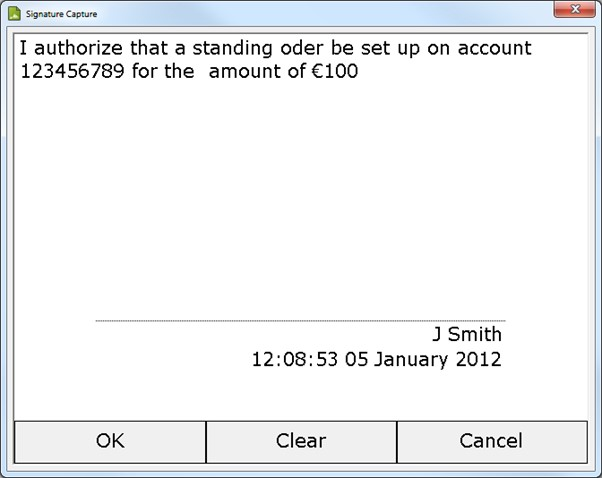
Capture Window Element Placement
The following table lists the values that can be used together with their type and effect(s).
Signature Capture Style
| Value | Type | Description |
|---|---|---|
| BtnsInside | DWORD | Non-zero (default) displays and responds to the OK/Clear/Cancel buttons on the pad display. A zero value displays the buttons outside the Windows capture dialog, and removes them from the pad display. |
| CaptureBackground | DWORD | A value to control the background texture of the capture window and for colour tablets. The default value is 0. 0 – disable background. 1 – use paper white texture. (all other values reserved for future use) |
| CaptureExtentX | DWORD | Sets width of the capture area in pixels. If not set, the size of the capture area is determined by the size of the digitizer. If this value is set, CaptureExtentY must also be set. |
| CaptureExtentY | DWORD | Sets height of the capture area in pixels. If not set, the size of the capture area is determined by the size of the digitizer. If this value is set, CaptureExtentX must also be set. |
| CaptureInkColor | String | A string representation of three comma-separated floating numbers between 0.0 and 1.0 inclusive for the RGB values of the ink on the screen and tablet (where supported). The default value is “0, 0, 0.545098”. |
| CaptureInkWidth | String | A string representation of a floating point number, stating the width of the ink on screen, in mm. The default value is “0.8”. |
| CaptureService | String | Limits the capture service(s) used: hid signpad tabletpc wintab One or more values can be defined, e.g. CaptureService=signpad;wintab. For tablet PCs this should be set to "tabletpc;wintab". |
| EnableSimulation | DWORD | Enable/disable simulation of signature capture when a digitizer is not installed. For example, to run a signature capture demonstration with no digitizer installed, simply ensure this key has been defined as non zero in the registry:sd: EnableSimulation=10 (or not present) = disable non-zero = enable |
| epInkWidth | DWORD | An enumeration value directly sent to the ePad-Ink to control ink width. The default value is 1. The following registry keys have been removed: WhoInside WhyInside WhenInside WhereInside InkingDigitizer |
| InkingDigitizer | DWORD | (v3.x no longer supported) Value: 0 - Assume non-inking characteristics. Value: 1 - Assume inking characteristics. Explicitly tunes the capture service for an inking digitizer. Dependent upon the underlying software drivers, this typically results in changes to the user interface, mouse handling and cursor display. |
| InsideFontFaceName | String | Name of font to use for text within the capture area. |
| InsideFontCharSet | DWORD | Character set to use for text within the capture area. (Appropriate values may be found in the Win32 API documentation.) |
| InsideFontHeight | DWORD | Point size of font to use for text within the capture area. |
| OutsideFontFaceName | String | Name of font to use for text outside of the capture area. |
| OutsideFontCharSet | DWORD | Character set to use for text outside of the capture area. |
| OutsideFontHeight | DWORD | Point size of font to use for text outside of the capture area. |
| ShowWaitDlg | DWORD | Optionally display 'initialising signature capture' to start signature capture: Value: 0 - do not display Value: 1 - display when starting signature capture (default) |
| SignatureGuideType | DWORD | 0 = horizontal line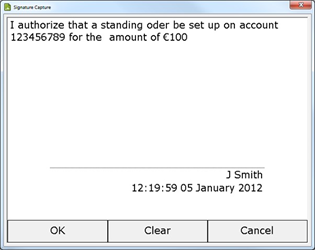 1, 2 = Box corners 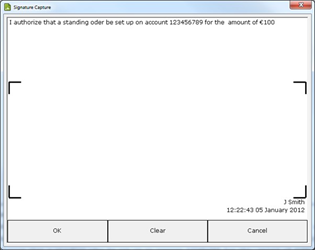 For these options, either BtnsInside should be 0, or InsideFontHeight should be reduced, otherwise buttons may overlap name and time; reason for signing should be limited to two lines otherwise top of box may be overwritten. Type 1 is a fixed size box; type 2 makes a (limited) adjustment to the top of the box for longer reason for signing strings. 3 = None 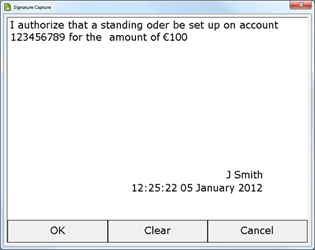 4 = Buttons on right 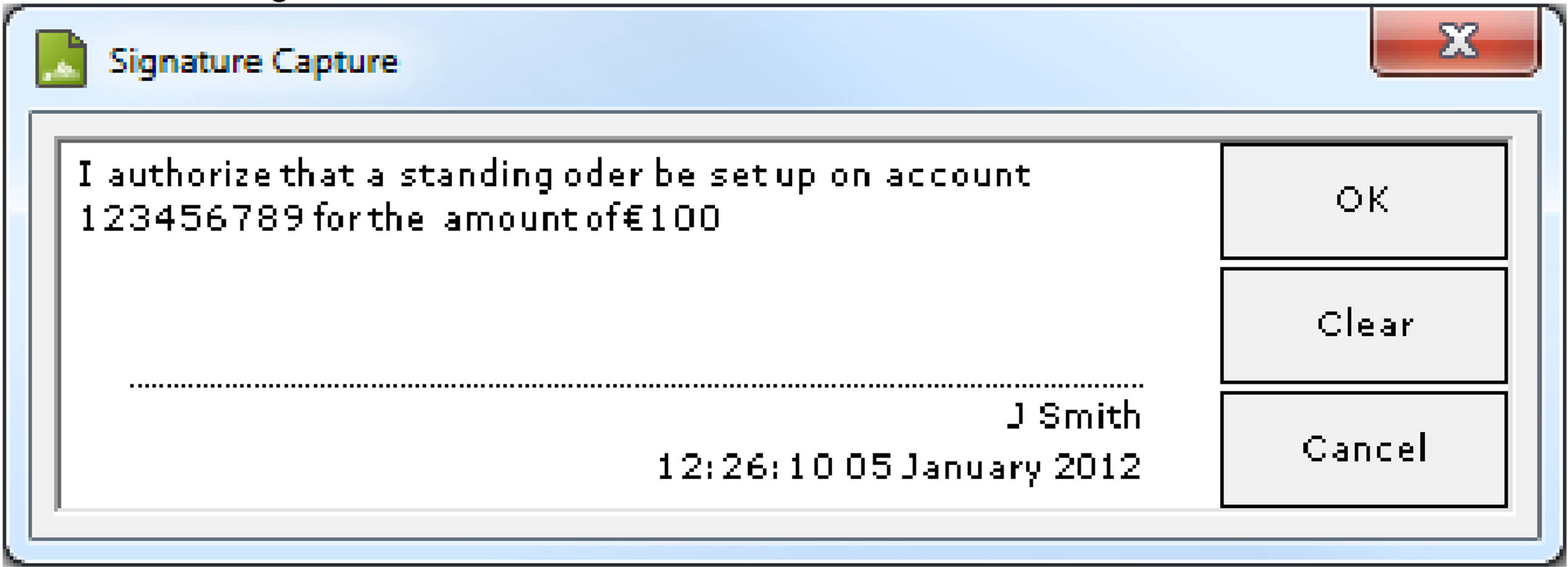 |
| stuInkWidth | DWORD | An enumeration value directly sent to the STU tablet to control ink width. Valid values are typically 0, 1, or 2. See the STU documentation for full details. |
| SyncCursor | DWORD | Non-zero to force the system cursor to mirror pen movements on screen during signature capture. |
| WhenInside | DWORD | (v3.x no longer supported) Non-zero to force date and time to appear within the capture area; zero to force it to appear outside (below) the capture area. |
| WhereInside | DWORD | (v3.x no longer supported) Non-zero to force location to appear within the capture area; zero to force it to appear outside (below) the capture area. |
| WhoInside | DWORD | (v3.x no longer supported) Non-zero to force signatory name to appear within the capture area; zero to force it to appear outside (below) the capture area. |
| WhyInside | DWORD | (v3.x no longer supported) Non-zero to force reason for signing to appear within the capture area; zero to force it to appear outside (above) the capture area. |
| WizardShowWait | DWORD | Applies to STU-430 and STU-530 only. If the setting is missing or non-zero, an hourglass icon will be displayed when the Wizard control updates the STU display. |
| wtLibrary | String | Full path and name of wintab dll to be used. |
| wtButtonMask | DWORD | Default: 0xffffffff. Value: bit-mask - Wintab Specification 1.1, section 7.4.1, pkButtons (absolute mode) Wintab driver specific. |
| wtMapDigitizer | DWORD | Default: 0 Value: 0 - do not map digitizer Value: 1 - map digitizer |
| wtPKTDATA | DWORD | Value: bit-mask - Wintab Specification 1.1, section 7.1, WTPKT. Some Wintab drivers do not correctly identify the data that they collect. This bit mask adds (binary OR) to the data reported by the digitizer. Note: altering this value may affect the forensic data that is stored. |
SigCom DLL Settings
Settings relating to the SigCom DLL can be configured using registry settings under the key:
HKEY_LOCAL_MACHINE\Software\Florentis\SigCom
On 64-bit Windows with a 32-bit Signature Library installation:
HKEY_LOCAL_MACHINE\Software\WOW6432Node\Florentis\SigCom
The following table lists the values which can be used together with their type and effect(s).
| Value | Type | Description |
|---|---|---|
| get_SigText | DWORD | Selects the format of the data returned when reading SigObj.SigText 16 = base 16 (hexadecimal) 64 = base 64 (default) any other value will generate an error when the property is read. The setting is not used when writing the signature data - the format is detected automatically. |
| language | String | User-interface language preference(s) as comma or semi-colon separated list of language IDs. e.g.: [HKEY_LOCAL_MACHINE\SOFTWARE\Wow6432Node\Florentis\SigCapt] "language"="FR;" If multiple IDs are defined the first language found will be used, For example for Belgian French or fallback to standard French: "language"="FR-BE;FR" |
| ResourceDLL | String | Full pathname to a language resource DLL Obsolete/Deprecated |
SigCapt DLL Settings
Settings relating to the SigCapt DLL can be configured using registry settings under the key:
HKEY_LOCAL_MACHINE\Software\Florentis\SigCapt
On 64-bit Windows with a 32-bit Signature Library installation:
HKEY_LOCAL_MACHINE\Software\WOW6432Node\Florentis\SigCapt
The following table lists the values which can be used together with their type and effect(s).
| Value | Type | Description |
|---|---|---|
| language | String | User-interface language preference(s) as comma or semi-colon separated list of language ids. |
| ResourceDLL | String | Full pathname to the language resource DLL Obsolete/Deprecated |
WizCOM DLL Settings
Settings relating to the SigCapt DLL can be configured using registry settings under the key:
HKEY_LOCAL_MACHINE\Software\Florentis\WizCOM
On 64-bit Windows with a 32-bit Signature Library installation:
HKEY_LOCAL_MACHINE\Software\WOW6432Node\Florentis\WizCOM
The following table lists the values which can be used together with their type and effect(s).
| Value | Type | Description |
|---|---|---|
| language | String | User-interface language preference(s) as comma or semi-colon separated list of language ids. |
| ResourceDLL | String | Full pathname to the language resource DLL Obsolete/Deprecated |