SigCtl
SigCtl
Summary
| Method | |
|---|---|
| AboutBox | |
| Capture | |
| GetProperty | |
| SetProperty | |
| Event | |
|---|---|
| Click | |
| DblClick | |
| KeyDown | |
| KeyPress | |
| KeyUp | |
| MouseDown | |
| MouseMove | |
| MouseUp | |
| PostCapture | |
| PreCapture | |
| Remove | |
| Note | |
|---|---|
| SigCtlXHTML extends this class and includes common methods and properties. | |
Methods
AboutBox
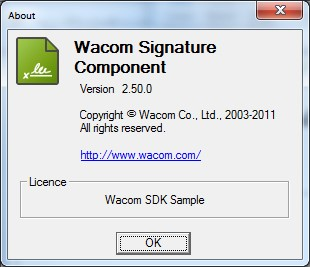
Displays an About Box for the control. The dialog box will display version, licensing and contact information:
| Void AboutBox() | |
|---|---|
| Parameters | |
| None | |
| Return Value | |
| None |
Capture
This method is deprecated; the DynamicCapture object should instead be used.
Displays a Signature Capture Window in which a user may sign their name using a digitizing tablet. The window contains three buttons:
- Clear: Clears the currently rendered signature.
- Cancel: Dismisses the window without capturing a signature.
- OK: Dismisses the window and captures the currently rendered signature.
| CaptureResult Capture(Who, Why, What, Key) | |
|---|---|
| Parameters | |
| Who | String specifying the signatory name. Optional if InputWho property is set. |
| Why | String specifying the reason for signing. Optional if InputWhy property is set. |
| What | Hash object derived from the data set with which the captured signature is to be bound. Typically, the data set is the content of the document or form signed by the user. |
| Key | Key object supplied to detect malicious or accidental tampering with the signature object or the signature data it contains. |
| Return Value | |
| CaptureResult | |
| CaptureOK | Signature captured successfully. |
| CaptureCancel | Signature not captured because the user cancelled the Signature Capture Window. |
| CapturePadError | No capture service available; typically, no functioning digitizing tablet or other device for capturing signatures was found. |
| CaptureNotLicensed | The component has not been licensed to perform capture. This may be due to an unsuitable license or unmet licensing conditions (e.g., no suitable hardware was found). |
| CaptureError | System error or another unusual error condition. |
| CaptureAbort | Signature not captured because the handler for the |
GetProperty
Returns the current value of a property.
| void GetProperty(Name) | |
|---|---|
| Parameters | |
| Name | The name of the property to retrieve. |
| Return Value | |
| Variant | |
| |
SetProperty
Sets the value of a named additional property, overriding a value set in the registry.
| void SetProperty(Name, Value) | |
|---|---|
| Parameters | |
| Name | String. Name of the property. |
| Value | Value to assign to the property. |
| Return Value | |
| Boolean | |
| |
Properties
| Property | Type | SigCtl Property Description |
|---|---|---|
AppData(Key) | Variant |
|
BackColor | OLE_COLOR |
|
BackStyle | Int |
|
BorderColor | OLE_COLOR |
|
BorderStyle | Int |
|
BorderVisible | Boolean |
|
BorderWidth | Int |
|
Caption | String |
|
CtlPadding | Short |
|
DisplayMode | DisplayMode (Enum) |
|
Font | IFontDisp |
|
ForeColor | OLE_COLOR |
|
InkColor | OLE_COLOR |
|
InkWidth | Float |
|
InputData | String |
|
InputSignature | String |
|
InputWho | String |
|
InputWhy | String |
|
Licence | Variant |
|
Rotation | Short |
|
ShowWhen | ShowText (Enum) |
|
ShowWho | ShowText (Enum) |
|
ShowWhy | ShowText (Enum) |
|
Signature | SigObj |
|
WhenFormat | String |
|
Zoom | Short |
|
Properties Supported by GetProperty/SetProperty
| Name | Get/Set | Type | Description |
|---|---|---|---|
| Licence | Get/Set | String | String containing the license used for signature capture |
| Component_FileVersion | Get | String | Component version e.g., "4.5.2.210" |
| DisablePropertyChange PostCapture | Get/Set | Boolean | Disables changing control properties after a signature has been captured |
| ShowWhere | Get/Set | ShowText | Specifies whether and how to display the location of signing within the Signature Area. See Enumerator Types for possible values. |
| UILanguage | Get/Set | String | Selects the language used in the signature capture dialog. |
| hWnd | Get/Set | Variant | Windows handle used to display the control |
Events
Click
Occurs when the user clicks (presses and then releases) a mouse button over a SigCtl.
| Private Sub object_Click() | |
|---|---|
| Parameters | |
| None | |
| Return Value | |
| None | |
DblClick
Occurs when the user double-clicks a mouse button over a SigCtl.
| Private Sub object_DblClick() | |
|---|---|
| Parameters | |
| None | |
| Return Value | |
| None | |
KeyDown
Occurs when the user presses a key while a SigCtl has the focus.
| Private Sub object_KeyDown( KeyCode, Shift ) | |
|---|---|
| Parameters | |
| KeyCode | Short integer code for the key pressed. Passed by reference; changing it sends a different code to the control (however, the control does not process key presses). |
| Shift | Short integer bit field indicating the state of the SHIFT (bit 0), CTRL (bit 1), and ALT (bit 2) keys at the time of the event. These bits correspond to values 1, 2, and 4 respectively. |
| Return Value | |
| None | |
KeyPress
Occurs when the user presses and releases an ANSI key while a SigCtl has the focus.
| Private Sub object_KeyPress( KeyAscii ) | |
|---|---|
| Parameters | |
| KeyAscii | A short integer that returns a standard numeric ANSI keycode. Passed by reference; changing it sends a different character to the control (however, the control does not process key presses). |
| Return Value | |
| None | |
KeyUp
Occurs when the user releases a key while a SigCtl has the focus.
| Private Sub object_KeyUp( KeyCode, Shift ) | |
|---|---|
| Parameters | |
| KeyCode | Short integer code for the key released. Passed by reference; changing it sends a different code to the control (however, the control does not process key presses). |
| Shift | Short integer bit field indicating the state of the SHIFT (bit 0), CTRL (bit 1), and ALT (bit 2) keys at the time of the event. These bits correspond to values 1, 2, and 4 respectively. |
| Return Value | |
| None | |
MouseDown
Occurs when the user presses a mouse button over a SigCtl.
| Private Sub object_MouseDown( Button, Shift, X, Y ) | |
|---|---|
| Parameters | |
| Button | Short integer identifying the button pressed. This is a bit field where bits correspond to the left button (bit 0, value = 1), right button (bit 1, value = 2), and middle button (bit 2, value = 4). |
| Shift | Short integer bit field indicating the state of the SHIFT, CTRL, and ALT keys at the time of the event. |
| X, Y | Current coordinates of the mouse pointer. |
| Return Value | |
| None | |
MouseMove
Occurs when the user moves the mouse over a SigCtl.
| Private Sub object_MouseMove( Button, Shift, X, Y ) | |
|---|---|
| Parameters | |
| Button | Short integer that corresponds to the state of the mouse buttons in which a bit is set if the button is down. The button argument is a bit field with bits corresponding to the left button (bit 0), right button (bit 1), and middle button (bit 2). It indicates the complete state of the mouse buttons; some, all, or none of these three bits can be set, indicating that some, all, or none of the buttons are pressed. |
| Shift | Short integer bit field indicating the state of the SHIFT (bit 0), CTRL (bit 1), and ALT (bit 2) keys at the time of the event. These bits correspond to the values 1, 2, and 4 respectively. Some, all, or none of the bits can be set, indicating that some, all, or none of the keys are down. |
| X, Y | Current coordinates of the mouse pointer. |
| Return Value | |
| None | |
MouseUp
Occurs when the user releases a mouse button over a SigCtl.
| Private Sub object_MouseUp( Button, Shift, X, Y ) | |
|---|---|
| Parameters | |
| Button | Short integer that identifies the button that was released. The button argument is a bit field with bits corresponding to the left button (bit 0, value = 1), right button (bit 1, value = 2), and middle button (bit 2, value = 4). Only one of the bits is set, indicating the button that caused the event. |
| Shift | Short integer bit field indicating the state of the SHIFT (bit 0), CTRL (bit 1), and ALT (bit 2) keys at the time of the event. These bits correspond to the values 1, 2, and 4 respectively. Some, all, or none of the bits can be set, indicating that some, all, or none of the keys are down. |
| X, Y | Current coordinates of the mouse pointer. |
| Return Value | |
| None | |